안녕하세요.
케이뱅크 데이터인텔리전스팀에서 Data Scientist로 일하고 있는 조용걸입니다.
1편에 이어서 Agentic AI 도입을 위한 사이드 프로젝트들을 진행하고 있는데요.
바닐라 코드를 통해 개념에 대한 이해와 함께 프로젝트에 대해 간략히 소개하고자 합니다.
프로젝트 이름은 A.P.B (AI Powered Bank)로 다양한 팀원 분들과 함께 진행하고 있습니다.
이 지면을 빌어서 감사함을 전합니다.
(사이드 프로젝트 제안에도 물심양면으로 도와주시는 훌륭하신 동료분들이 케이뱅크에 많이 있습니다!)
데이터인텔리전스팀 – 조용걸님
데이터AI서비스팀 – 임태훈, 하진관님
플랫폼아키텍쳐팀 – 김원익님
뱅킹서비스개발팀 – 도승훈님
여신플랫폼개발팀 – 진소희님
정보보호팀 – 김원경, 김남석님
IT인프라팀 – 이관우님
+ 재미있는 과제 같다며 열심히 해 보라고 격려주신 홍종님, 원영님, 진식님, 기환님도 감사드려요.

A.P.B (AI Powered Bank)
A.P.B 프로젝트는 Agentic AI가 태동 단계이므로 A2A / MCP에 대한 개념 이해와 실제 적용이 가능한가(?)에 대한 Feasibility를 보기 위함이 목적으로 최소한도의 기능 구현과 실제 실용적인 시나리오 발굴을 목표로 하고 있습니다.
Agentic AI씬은 크게 대고객 시나리오, 내부 업무 시나리오 2개로 크게 나뉠 수 있을 것 같습니다.
이 중 몇 시나리오만 로컬 PC에서 Gpt-4o모델을 이용하여 PoC를 진행하였고 현재 이 코드 베이스를 바탕으로 행 내부에 구현을 목표로 하고 있습니다.
대고객 시나리오
- 이체 (사용자 간 이체, 수신상품 입금 등)
- 거래 내역을 기반으로 소비 조언
- 고객 상담 Q&A
- …
내부 업무 시나리오
- 사업(마케팅) 실적 조회
- 데이터 분석 (인사이트 제공)
- 내부 정보 요약 (Jira, Confluence)
- 사내 Q&A
- …
프로젝트 구조 및 구성
바닐라 프로젝트의 구조 및 시나리오 구성은 아래와 같습니다.
1편의 A2A, MCP개념들을 참고하여 프로젝트를 개발하였으며 개념 이해와 Feasibility가 목적이기 때문에 Agent들을 별도의 어플리케이션으로 배포하진 않았습니다. 인터페이스는 Streamlit을 이용한 챗봇 그리고 MCP는 FastAPI로 배포하였습니다.
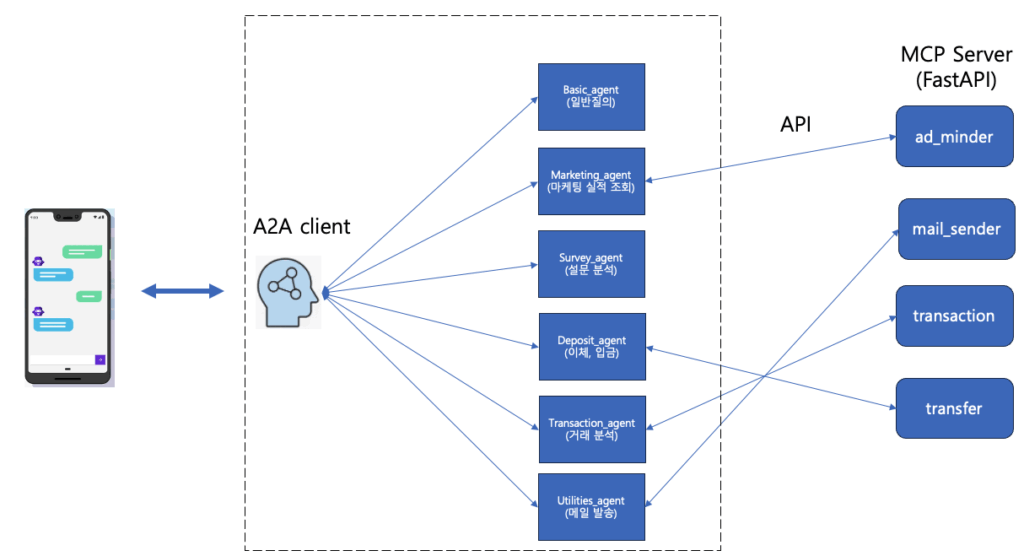
프로젝트 구조도
## 프로젝트 구조
├── a2a_mcp_demo
│ ├── assets
│ │ └── navy_left.png
│ ├── agents
│ │ ├── agent_base.py
│ │ ├── basic_agent
│ │ │ ├── agent.py
│ │ │ └── card.json
│ │ ├── marketing_agent
│ │ │ ├── agent.py
│ │ │ └── card.json
│ │ ├── survey_agent
│ │ │ ├── agent.py
│ │ │ └── card.json
│ │ ├── susin_agent
│ │ │ ├── agent.py
│ │ │ └── card.json
│ │ ├── transaction_agent
│ │ │ ├── agent.py
│ │ │ └── card.json
│ │ └── utilities_agent
│ │ ├── agent.py
│ │ └── card.json
│ ├── components
│ │ ├── banner.py
│ │ ├── signals.py
│ │ └── susin_modal.py
│ └── tools
│ ├── mcp_servers.json
│ ├── ad_minder
│ │ ├── ad_minder.py
│ │ ├── manifest.json
│ │ └── run_ad_minder_server.sh
│ ├── mail_sender
│ │ ├── config.json
│ │ ├── mail_sender.py
│ │ ├── manifest.json
│ │ └── run_mail_sender_server.sh
│ ├── transaction
│ │ ├── manifest.json
│ │ ├── run_transaction_server.sh
│ │ └── transaction.py
│ └── transfer
│ ├── manifest.json
│ ├── run_transfer_server.sh
│ └── transfer.py
│ ├── a2a_client.py
│ ├── app.py
│ ├── run_client_server.sh
├── meta
│ └── overview.png
├── README.md
├── requirements.txt
card.json (Agent card)
{
“schema_version”: “1.0”,
“name”: “UtilitiesAgent”,
“description”: “사용자의 자연어 요청을 분석해 적합한 MCP 도구를 선택/호출합니다. 이메일 발송, 회의록 요약, 일정/알림 안내, 간단한 변환·조회 등 유틸리티 작업을 담당합니다.”,
“version”: “0.2.0”,
“capabilities”: [
{
“name”: “execute”,
“description”: “자연어 유틸리티 실행 요청을 받아 적합한 MCP 도구를 판단하여 업무를 수행합니다.”,
“parameters”: {
“type”: “object”,
“properties”: {
“user_input”: { “type”: “string”, “description”: “자연어 유틸리티 실행 요청 및 응답” }
},
“required”: [“user_input”]
}
}
],
“metadata”: {
“keywords”: [“utilities”, “메일”, “email”, “전송”, “회의록”, “요약”, “알림”, “일정”, “변환”, “조회”],
“tools”: [“mail_sender”]
}
}
menifest.json (MCP-tool)
{
“server”: “ad_minder”,
“tools”: [
{
“name”: “performance”,
“description”: “배너 번호와 기간(시작/종료)을 입력받아 해당 배너의 실적(노출/클릭/CTR)을 반환합니다.”,
“parameters”: {
“type”: “object”,
“properties”: {
“bnnr_id”: {“type”: “integer”, “description”: “배너 번호”},
“start_date”: {“type”: “string”, “description”: “조회 시작일 (YYYY-MM-DD)”},
“end_date”: {“type”: “string”, “description”: “조회 종료일 (YYYY-MM-DD)”}
},
“required”: [“bnnr_id”, “start_date”, “end_date”]
}
}
]
}
개발 구성
바닐라 프로젝트에서 구현된 여러 시나리오 중에 마케팅실적 조회를 예시로 들어보겠습니다.
사업부서에 많은 마케터들은 본인이 관리하는 상품과 서비스에 대해서 마케팅 캠페인(배너, 푸쉬, LMS 등)을 진행하고 이 캠페인 실적에 대해 모니터링하는데요. 실적을 보기 위해서 데이터를 볼 수 있는 환경에 접속하여 매번 쿼리를 작성하고 그 결과를 다운로드 받아야 합니다.
쿼리가 익숙지 않거나 데이터 조회를 위해서 어떤 테이블을 조회해야 하는지 모르는 직원의 경우 위 프로세스에 적응하기까지 데이터 분석팀에 도움을 요청하거나 어려움을 겪는 경우가 종종 발생하는데요. Agent와 MCP로 구성한다면 어떻게 전개가 되는지 배너 실적 조회 시나리오를 통해 Step by Step으로 살펴보겠습니다.
프로세스는 다음과 같습니다.
- 사용자 질의 요청을 받음 (Streamlit 챗봇 인터페이스)
- A2A client가 Agent 라우팅 역할을 하여 어떤 Agent가 사용자 요청을 수행하기 적합한지 판단
- Agent에게 사용자 요청을 전달
- Agent는 사용자 요청을 처리하기 위해 본인이 가지고 있는 도구를 사용할지 판단
- 도구를 사용하였다면 그 결과를 활용하여 사용자 질의를 처리하여 전달함
1. 사용자 질의 요청을 받음
-> 1232번 배너 2025.08.08일 실적 알려줄래?
2. A2A client가 Agent 라우팅 역할을 하여 어떤 Agent가 사용자 요청을 수행하기 적합한지 판단함
-> A2A client가 Agent들의 card.json을 읽어서 사용자 질의를 처리하기 위한 Agent를 선택합니다.
– 라우팅 프롬프트 (A2A → LLM)
최신 사용자 입력: “1232번 배너 2025.08.08일 실적 알려줄래?”
아래는 사용할 수 있는 Agent 목록(요약):
[
{
“name”: “DirectAnswerAgent”,
“description”: “일반 질문에 직접 답변하는 기본 에이전트”,
“keywords”: [
“direct”,
“fallback”,
“chat”
]
},
{
“name”: “DepositAgent”,
“description”: “사용자의 입출금 거래 이체 명령 등을 수행하는 Agent입니다.”,
“keywords”: [
“입금”,
“적금”,
“예금”,
“이체”
]
},
{
“name”: “MarketingAgent”,
“description”: “배너, 마케팅 실적 조회, 캠페인 아이디어, 카피, 채널 믹스 제안 등 마케팅 관련 요청 담당”,
“keywords”: [
“배너”,
“marketing”,
“캠페인”,
“카피”,
“브랜딩”,
“채널”
]
},
{
“name”: “SurveyAnalysisAgent”,
“description”: “설문/리뷰/피드백 텍스트에서 핵심 인사이트와 액션 아이템을 도출”,
“keywords”: [
“설문”,
“survey”,
“응답”,
“리서치”,
“분석”,
“insight”
]
},
{
“name”: “TransactionAgent”,
“description”: “사용자의 거래 내역을 조회하여 이를 바탕으로 지출, 소비 습관에 대한 피드백을 주는 Agent 입니다.”,
“keywords”: [
“거래내역”,
“소비”,
“지출”,
“피드백”
]
},
{
“name”: “UtilitiesAgent”,
“description”: “사용자의 자연어 요청을 분석해 적합한 MCP 도구를 선택/호출합니다. 이메일 발송, 회의록 요약, 일정/알림 안내, 간단한 변환·조회 등 유틸리티 작업을 담당합니다.”,
“keywords”: [
“utilities”,
“메일”,
“email”,
“전송”,
“회의록”,
“요약”,
“알림”,
“일정”,
“변환”,
“조회”
]
}
]
당신의 임무는 이 요청을 가장 잘 처리할 Agent를 ‘정확한 이름으로 1개’ 선택하는 것입니다.
반드시 아래 JSON 형식으로만 답변하세요(코드블록 금지):
{
“route”: “AGENT”,
“agent_name”: “<선택한 Agent name>”,
“reason”: “이 Agent를 선택한 이유”
}
– 라우팅 결과 (LLM JSON)
{
“route”: “AGENT”,
“agent_name”: “MarketingAgent”,
“reason”: “사용자가 요청한 ‘1232번 배너 2025.08.08일 실적’은 마케팅 실적 조회와 관련된 내용이므로, 배너 및 마케팅 실적 조회를 담당하는 MarketingAgent가 가장 적합합니다.”
}
3 & 4. Agent에게 사용자 요청을 전달 & Agent는 사용자 요청을 처리하기 위해 본인이 가지고 있는 도구를 사용할지 판단
-> Agent가 사용자 질의를 처리하기 위해 도구가 필요한지 판단하고 필요하다면 도구에 인풋 파라미터를 추출하여 호출합니다.
– Tool 선택 프롬프트
역할: 너는 실무형 마케팅 전략가다. 간결하지만 실행 가능한 제안을 한다. 모든 제안은 한국어로, 불릿 3~5개, 각 불릿은 1문장.
사용자 입력: “1232번 배너 2025.08.08일 실적 알려줄래?”
아래는 사용 가능한 MCP 툴 목록입니다:
[
{
“mcp”: “ad_minder”,
“tool_name”: “performance”,
“description”: “배너 번호와 기간(시작/종료)을 입력받아 해당 배너의 실적(노출/클릭/CTR)을 반환합니다.”,
“parameters”: {
“type”: “object”,
“properties”: {
“bnnr_id”: {
“type”: “integer”,
“description”: “배너 번호”
},
“start_date”: {
“type”: “string”,
“description”: “조회 시작일 (YYYY-MM-DD)”
},
“end_date”: {
“type”: “string”,
“description”: “조회 종료일 (YYYY-MM-DD)”
}
},
“required”: [
“bnnr_id”,
“start_date”,
“end_date”
]
}
}
]
당신의 임무는 사용자의 요청에 적절한 MCP Tool이 있는지 판단하고, 있다면 어떤 Tool이고 어떤 파라미터를 넘겨야 하는지를 결정하는 것입니다.
선정/비선정의 이유(reason)를 1~2문장으로 함께 제공하세요.
출력 형식 규칙 (아주 중요):
– 반드시 아래 세 가지 형식 중 하나여야 합니다.
– JSON만 단독으로 출력해야 하며, 어떠한 설명, 코드블록(예: “`json), 주석, 추가 텍스트도 포함하지 마세요.
– JSON 키와 값은 정확히 지정된 구조만 사용하세요.
– 특히 “reason” 값은 예시 문구를 복사하지 말고, **현재 사용자 요청과 선택한 경로에 맞는 구체적이고 간단한 이유**를 반드시 작성하세요.
1) 호출 가능 (필수 파라미터 충족 → Tool 실행 가능)
{
“mcp”: “<mcp 이름>”,
“tool_name”: “<tool 이름>”,
“arguments”: { <파라미터 키:값> },
“route”: “TOOL”,
“reason”: “왜 이 도구를 선택했는지 간단한 근거”
}
2) 호출 불가 – Tool은 맞지만 필수 파라미터 부족
{
“route”: “TOOL_INCOMPLETE”,
“reason”: “Tool을 사용해야 하지만 필수 파라미터가 부족하여 호출 불가능한 이유”
}
3) 호출 불가 – Tool이 없거나, 없어도 직접 해결 가능
{
“route”: “DIRECT”,
“reason”: “적합한 Tool이 없거나, Tool이 필요하지 않아 직접 처리 가능한 이유”
}
Tool 선택 결과 (LLM JSON)
{
“mcp”: “ad_minder”,
“tool_name”: “performance”,
“arguments”: {
“bnnr_id”: 1232,
“start_date”: “2025-08-08”,
“end_date”: “2025-08-08”
},
“route”: “TOOL”,
“reason”: “사용자가 요청한 배너 번호와 날짜에 대한 실적을 조회하기 위해 적합한 Tool이 존재하며, 필요한 모든 파라미터가 제공되었습니다.”
}
Agent 코드 예시
여러 Agent에서 사용되는 공통 유틸리티성 함수(로깅, Tool 선택 프롬프트 등)들을 agent_base.py에 MCPAgentBase 클래스로 정의하였고 핵심 로직은 이 클래스를 상속받아 Agent들이 만들어지게 설계하였습니다.
agent_base.py
class MCPAgentBase:
“””
최소 책임:
– tools/*/manifest.json + tools/mcp_servers.json 로 레지스트리 구성
– LLM으로 MCP 도구 선택 질의 (ask_gpt_for_tool)
– 선택된 도구 호출 (call_mcp)
– arguments JSON Schema 검증 (validate_args)
“””
init_system: str = “”
def __init__(self, llm_client: OpenAI, agent_dir: Optional[Path] = None):
self.llm: OpenAI = llm_client
self.agent_dir: Path = agent_dir or Path(__file__).parent
self.run_log: List[Dict[str, Any]] = []
# card.json
self.card: Dict[str, Any] = self._read_json(self.agent_dir / “card.json”) or {}
meta: Dict[str, Any] = self.card.get(“metadata”) or {}
raw_tools = meta.get(“tools”, [])
self.allow_all_tools: bool = False
if isinstance(raw_tools, str) and raw_tools.strip() == “*”:
self.allow_all_tools = True
self.allowed_servers: set[str] = set()
elif isinstance(raw_tools, list):
self.allowed_servers = set(raw_tools)
else:
self.allowed_servers = set()
project_root = Path(__file__).resolve().parents[1]
self.tools_root: Path = project_root / “tools”
self.server_map: Dict[str, str] = self._read_json(self.tools_root / “mcp_servers.json”) or {}
self.registry: Dict[str, Dict[str, Dict[str, Any]]] = self._load_registry()
def list_tools_for_prompt(self) -> List[Dict[str, Any]]:
out: List[Dict[str, Any]] = []
for server, tools in self.registry.items():
for name, spec in tools.items():
out.append({
“mcp”: server,
“tool_name”: name,
“description”: spec.get(“description”, “”),
“parameters”: spec.get(“parameters”, {}),
})
return out
def build_tool_selection_prompt(self, user_input: str) -> str:
role_text = (
self.init_system
or (self.card.get(“description”) if isinstance(self.card, dict) else “”)
or “도구를 적절히 선택해 문제를 해결하는 전문가”
)
tool_metadata = self.list_tools_for_prompt()
prompt = f”””
역할: {role_text}
사용자 입력: “{user_input}”
아래는 사용 가능한 MCP 툴 목록입니다:
{json.dumps(tool_metadata, indent=2, ensure_ascii=False)}
당신의 임무는 사용자의 요청에 적절한 MCP Tool이 있는지 판단하고, 있다면 어떤 Tool이고 어떤 파라미터를 넘겨야 하는지를 결정하는 것입니다.
선정/비선정의 이유(reason)를 1~2문장으로 함께 제공하세요.
출력 형식 규칙 (아주 중요):
– 반드시 아래 세 가지 형식 중 하나여야 합니다.
– JSON만 단독으로 출력해야 하며, 어떠한 설명, 코드블록(예: “`json), 주석, 추가 텍스트도 포함하지 마세요.
– JSON 키와 값은 정확히 지정된 구조만 사용하세요.
– 특히 “reason” 값은 예시 문구를 복사하지 말고, **현재 사용자 요청과 선택한 경로에 맞는 구체적이고 간단한 이유**를 반드시 작성하세요.
1) 호출 가능 (필수 파라미터 충족 → Tool 실행 가능)
{{
“mcp”: “<mcp 이름>”,
“tool_name”: “<tool 이름>”,
“arguments”: {{ <파라미터 키:값> }},
“route”: “TOOL”,
“reason”: “왜 이 도구를 선택했는지 간단한 근거”
}}
2) 호출 불가 – Tool은 맞지만 필수 파라미터 부족
{{
“route”: “TOOL_INCOMPLETE”,
“reason”: “Tool을 사용해야 하지만 필수 파라미터가 부족하여 호출 불가능한 이유”
}}
3) 호출 불가 – Tool이 없거나, 없어도 직접 해결 가능
{{
“route”: “DIRECT”,
“reason”: “적합한 Tool이 없거나, Tool이 필요하지 않아 직접 처리 가능한 이유”
}}
“””.strip()
self.log(“tool.prompt”, role_text=role_text, user_input=user_input, tool_count=len(tool_metadata))
return prompt
def ask_gpt_for_tool(self, user_input: str, *, prompt_override: Optional[str] = None) -> Dict[str, Any]:
prompt = prompt_override or self.build_tool_selection_prompt(user_input)
res = self.llm.chat.completions.create(
model=”gpt-4o”,
messages=[{“role”: “user”, “content”: prompt}],
temperature=0,
)
raw = (res.choices[0].message.content or “”).strip()
self.log(“tool.decision.raw”, raw=raw)
try:
data = json.loads(raw)
except Exception:
self.log(“tool.decision.parse_error”)
return {“route”: “DIRECT”, “error”: “parse_error”, “raw”: raw}
if “server” in data and “mcp” not in data:
data[“mcp”] = data.pop(“server”)
if data.get(“route”) == “TOOL”:
if not data.get(“mcp”) or not data.get(“tool_name”):
return {“route”: “DIRECT”, “error”: “missing_keys”, “raw”: data}
data.setdefault(“arguments”, {})
self.log(“tool.decision.parsed”, decision=data)
return data
def call_mcp(self, mcp: str, tool_name: str, args: Dict[str, Any], *, stream: bool = True):
if mcp not in self.registry or tool_name not in self.registry[mcp]:
raise RuntimeError(f”Unregistered tool: {mcp}.{tool_name}”)
if mcp not in self.server_map:
raise RuntimeError(f”Unknown server host: {mcp}”)
spec = self.registry[mcp][tool_name]
base = self.server_map[mcp].rstrip(“/”)
url = f”{base}{spec[‘path’]}”
method = (spec[“method”] or “POST”).upper()
t0 = time.time()
self.log(“mcp.call.start”, mcp=mcp, tool=tool_name, url=url, method=method, args=args, stream=stream)
if method == “GET”:
res = requests.get(url, params=args or {}, stream=stream, timeout=None)
else:
res = requests.post(url, json=args or {}, stream=stream, timeout=None)
self.log(“mcp.call.response.head”,
status=res.status_code,
headers=dict(res.headers),
elapsed_ms=int((time.time() – t0) * 1000))
res.raise_for_status()
if not stream:
data = res.json()
try:
preview = json.dumps(data, ensure_ascii=False)[:1000]
except Exception:
preview = str(data)[:1000]
self.log(“mcp.call.response.body”, size=len(preview), preview=preview)
return data
def gen() -> Iterator[str]:
bytes_total = 0
for chunk in res.iter_content(chunk_size=None):
if chunk:
bytes_total += len(chunk)
yield chunk.decode(errors=”ignore”)
self.log(“mcp.call.stream.end”,
bytes_total=bytes_total,
elapsed_ms=int((time.time() – t0) * 1000))
return gen()
def execute(self, user_input: str, debug: Optional[Dict[str, Any]] = None):
raise NotImplementedError
def _incomplete_stream(self, user_input: str, reason: Optional[Dict[str, Any]] = None) -> Iterator[str]:
user_prompt = (
“실패 이유를 토대로 사용자에게 양해를 구해줘.\n”
“사용자가 잘 이해할 수 있게 친절하고 줄바꿈해서!\n”
f”사용자 요청 : {user_input}”
f”실패 이유 : {reason}”
)
messages = [
{“role”: “user”, “content”: user_prompt},
]
resp = self.llm.chat.completions.create(model=”gpt-4o”, messages=messages, stream=True)
for ch in resp:
if getattr(ch.choices[0].delta, “content”, None):
yield ch.choices[0].delta.content
… (생략)
marketing_agent.py
class Agent(MCPAgentBase):
“””
정책:
– MCP 도구가 선택·검증·호출까지 성공하면, 결과 데이터를 근거로 요약 응답(스트리밍)
– 그렇지 않으면 Direct 응답(스트리밍)
“””
init_system = (
“너는 실무형 마케팅 전략가다. 간결하지만 실행 가능한 제안을 한다. “
“모든 제안은 한국어로, 불릿 3~5개, 각 불릿은 1문장.”
)
def __init__(self, llm_client: OpenAI):
super().__init__(llm_client, agent_dir=Path(__file__).parent)
# —- Direct 모드(스트리밍) —-
def _direct_stream(self, user_input: str, debug: Optional[Dict[str, Any]] = None) -> Iterator[str]:
user_prompt = (
“다음 요청에 대해 실행 가능한 제안을 간결히 제시해줘.\n”
f”사용자 요청 : {user_input}”
)
if debug is not None:
debug.setdefault(“execution”, {}).setdefault(“direct”, {})[“prompt”] = f”””
[시스템 프롬프트]
{self.init_system}
[유저 프롬프트]
{user_prompt}
“””
self._log(debug, “direct.start”, user_input=user_input)
messages = [
{“role”: “system”, “content”: self.init_system},
{“role”: “user”, “content”: user_prompt},
]
resp = self.llm.chat.completions.create(model=”gpt-4o”, messages=messages, stream=True)
for ch in resp:
if getattr(ch.choices[0].delta, “content”, None):
yield ch.choices[0].delta.content
self._log(debug, “direct.end”)
# —- MCP 결과 기반 요약(스트리밍) —-
def _summarize_with_data(
self,
user_input: str,
data,
*,
debug: Optional[Dict[str, Any]] = None,
mcp: Optional[str] = None,
tool: Optional[str] = None,
args: Optional[Dict[str, Any]] = None,
) -> Iterator[str]:
# 데이터 프리뷰(길이 제한)
try:
preview = data if isinstance(data, str) else json.dumps(data, ensure_ascii=False)[:500]
except Exception:
preview = str(data)[:500]
self._log(debug, “summarize.start”, mcp=mcp, tool=tool, args=args, data_preview=preview)
try:
data_text = data if isinstance(data, str) else json.dumps(data, ensure_ascii=False, indent=2)
except Exception:
data_text = str(data)
messages = [
{“role”: “system”, “content”: self.init_system},
{“role”: “user”, “content”:
“아래 ‘도구 결과’를 근거로, 요청에 맞는 마케팅 인사이트를 불릿 3~5개로 요약해줘.\n”
f”요청: {user_input}\n\n도구 결과:\n{data_text}”
},
]
resp = self.llm.chat.completions.create(model=”gpt-4o”, messages=messages, stream=True)
for ch in resp:
if getattr(ch.choices[0].delta, “content”, None):
yield ch.choices[0].delta.content
self._log(debug, “summarize.end”)
# —- 실행 엔트리포인트 —-
def execute(self, user_input: str, debug: Optional[Dict[str, Any]] = None):
if debug is None:
debug = {}
self._log(debug, “run.start”, user_input=user_input)
has_tools = any(self.registry.values())
debug.setdefault(“execution”, {})[“plan”] = {“mode”: None}
self._log(debug, “registry”, has_tools=has_tools, servers=list(self.registry.keys()))
if has_tools:
tool_prompt = self.build_tool_selection_prompt(user_input)
self._log(debug, “tool.prompt.ready”)
debug[“execution”][“tool_selection_prompt”] = tool_prompt
decision = self.ask_gpt_for_tool(user_input, prompt_override=tool_prompt)
self._log(debug, “tool.decision”, decision=decision)
debug[“execution”][“decision”] = decision
if decision.get(“route”) == “TOOL”:
mcp = decision[“mcp”]
tool = decision[“tool_name”]
args = decision.get(“arguments”, {})
v = self.validate_args(mcp, tool, args)
debug[“execution”][“validation”] = v
self._log(debug, “tool.validation”, ok=v[“ok”], errors=v[“errors”], warnings=v[“warnings”])
if v[“ok”]:
try:
self._log(debug, “mcp.call.start”, mcp=mcp, tool=tool, args=args)
data = self.call_mcp(mcp, tool, args, stream=False)
self._log(debug, “mcp.call.ok”) # 상세 데이터는 summarize 단계에서 preview만 기록
debug[“execution”][“plan”] = {“mode”: “mcp”, “mcp”: mcp, “tool”: tool}
self._log(debug, “plan”, mode=”mcp”, mcp=mcp, tool=tool)
yield from self._summarize_with_data(
user_input, data, debug=debug, mcp=mcp, tool=tool, args=args
)
self._log(debug, “run.end”, status=”ok”)
debug[“log”] = debug.get(“events”, [])
return
except Exception as ex:
debug[“execution”][“plan”] = {“mode”: “direct”, “reason”: f”mcp_call_failed: {ex}”}
self._log(debug, “mcp.call.error”, error=str(ex))
yield from self._incomplete_stream(user_input, ex)
else:
debug[“execution”][“plan”] = {“mode”: “direct”, “reason”: “validation_failed”}
self._log(debug, “plan”, mode=”direct”, reason=”validation_failed”)
yield “[인자 검증 실패 → Direct로 전환]\n”
for e in v[“errors”]:
yield f”- {e}\n”
elif decision.get(“route”) == “TOOL_INCOMPLETE”:
reason = decision[“reason”]
debug[“execution”][“plan”] = {“mode”: “incomplete”, “reason”: decision.get(“reason”, reason)}
self._log(debug, “plan”, mode=”incomplete”, reason=decision.get(“reason”))
yield from self._incomplete_stream(user_input, reason)
else:
debug[“execution”][“plan”] = {“mode”: “direct”, “reason”: decision.get(“reason”, “llm_decision_direct”)}
self._log(debug, “plan”, mode=”direct”, reason=decision.get(“reason”))
yield from self._direct_stream(user_input, debug=debug)
else:
yield from self._direct_stream(user_input, debug=debug)
debug[“execution”][“plan”] = {“mode”: “direct”, “reason”: “no_tools”}
self._log(debug, “plan”, mode=”direct”, reason=”no_tools”)
self._log(debug, “run.end”, status=”ok”)
debug[“log”] = debug.get(“events”, []) # ← 추가
MCP 코드 예시
Feasibility Test가 목적이었기 때문에 FastAPI 형태로 MCP 서버를 배포하되 데이터는 미리 정의된 데이터를 요청에 맞게 사전에 정의된 dataframe에서 조회하여 가져오는 방향으로 개발하였습니다.
# ad_minder.py
import uvicorn
import pandas as pd
from fastapi import FastAPI
from pydantic import BaseModel, Field
from fastapi.responses import JSONResponse
from typing import Optional
from datetime import datetime
app = FastAPI()
# ———————————————
# 예시 데이터셋 (여러 배너/여러 날짜)
# ———————————————
# 컬럼: bnnr_id, base_dt, impression_cnt, click_cnt
# 날짜는 문자열이 아닌 pandas datetime으로 보관
… (생략)
# ———————————————
# 요청 스키마
# ———————————————
class PerformanceRequest(BaseModel):
bnnr_id: int = Field(…, description=”배너 번호 (정수)”)
start_date: str = Field(…, description=”조회 시작일 (YYYY-MM-DD)”)
end_date: str = Field(…, description=”조회 종료일 (YYYY-MM-DD)”)
… (생략)
# ———————————————
# 엔드포인트
# ———————————————
@app.post(“/tool/performance”)
def get_performance(request: PerformanceRequest):
“””
입력 예:
{
“bnnr_id”: 1232,
“start_date”: “2025-08-09”,
“end_date”: “2025-08-11”
}
출력 예(집계 결과 중심):
{
“bnnr_id”: 1232,
“start_date”: “2025-08-09”,
“end_date”: “2025-08-11”,
“grouped”: [
{“bnnr_id”: 1232, “impression_sum”: 393, “click_sum”: 38, “ctr”: 0.096698}
],
“records”: […일자별 원본…],
“summary”: {“total_impression”: 393, “total_click”: 38, “ctr”: 0.096698, “days”: 3, “date_range”: {“start”: “2025-08-09”, “end”: “2025-08-11”}},
“message”: null
}
“””
payload = build_payload(request.bnnr_id, request.start_date, request.end_date)
return JSONResponse(content=payload, media_type=”application/json; charset=utf-8″)
@app.get(“/tools”)
def list_tools():
# 오픈API 식 파라미터 스키마 제공
return [
{
“name”: “performance”,
“description”: “배너 번호와 기간(시작/종료)을 입력받아 해당 배너의 실적(노출/클릭/CTR)을 반환합니다.”,
“parameters”: {
“type”: “object”,
“properties”: {
“bnnr_id”: {“type”: “integer”, “description”: “배너 번호”},
“start_date”: {“type”: “string”, “description”: “조회 시작일 (YYYY-MM-DD)”},
“end_date”: {“type”: “string”, “description”: “조회 종료일 (YYYY-MM-DD)”}
},
“required”: [“bnnr_id”, “start_date”, “end_date”]
}
}
]
if __name__ == “__main__”:
# 파일명이 ad_minder.py 라고 가정
uvicorn.run(“ad_minder:app”, host=”0.0.0.0″, port=8002, reload=True)
마치며
클로드, 커서 AI, ChatGPT에서 MCP 기능을 사용자들에게 손쉽게 제공함에 따라 주요 어플리케이션들(Slack, Figma, Notion 등)도 MCP에 맞춰 API형태로 서비스를 제공하고 있습니다. 이에 따라서 점점 우리가 업무를 하는 행태도 빠르게 변화하고 있고 이미 AI 없이 프로그래밍을 할 수 있을까?라는 생각이 드는 요즘입니다.
이러한 일련의 프로젝트를 통해 행에 도움 될 수 있는 시나리오들을 사전에 준비하고 그에 맞춰서 사내 시스템을 손쉽게 연동할 수 있는 상태로 준비한다면, 추후에 매니지드 시스템 또는 상용 솔루션이 도입되었을 때 케이뱅크가 AI로 인터넷 은행을 선도하는 AI Powered Bank가 되는 모습을 상상하며 글을 마무리하고자 합니다.
긴 글 읽어주셔서 감사합니다.
[금융 속 AI ①] 은행은 왜 AI에 투자할까?
[인턴십] 2기 인턴 워크샵 하이라이트
[케미스토리] 개발자가 ‘자율’적으로 일하는 법